

Industry Insights
Arduino Alternatives for Professional Prototypes: How Quickboards Bridges the Gap

Oct
When a project outgrows the hobbyist phase, you need a prototyping solution that doesn’t fall apart under the weight of real-world deadlines and customer requirements. The transition from a breadboard to a final Bill of Materials (BOM) usually exposes the “Arduino wall”—a point where performance ceilings, reliability issues, and massive rework cycles begin to stall progress.
Quickboards was designed to eliminate this friction. It provides a modular ecosystem that combines the rapid development speed of Arduino with the engineering rigor required for production—offering verified schematics, reusable circuit blocks, and firmware that integrates directly into professional toolchains.
Why Arduino Is Not Enough for Professional Hardware Development
Arduino fundamentally changed how we approach electronics by lowering the barrier to entry. It took complex embedded systems and made them accessible to everyone from students to startup founders. By abstracting away the difficult hardware and firmware details, it replaced intimidation with rapid experimentation.
While it’s an incredible tool for early-stage tinkering, its limitations become a liability once you enter the commercial world. The same abstractions that make Arduino easy to use eventually become bottlenecks that hinder timing, power management, and long-term reliability.
The Hobbyist Roots of Arduino
Arduino’s primary goal was the democratization of electronics, not industrial utility. Its open-source hardware and simple C++ wrappers were designed so someone could blink an LED or read a sensor in minutes. While this fueled the maker movement, it came at a cost: fine-grain control.
Professional engineers need deterministic performance, strict memory management, and tight power budgets. In a commercial environment where certifications and unit costs are everything, the “convenience” of the Arduino ecosystem often turns into a technical constraint that prevents a product from being truly market-ready.
Where Arduino Projects Hit Their Limits
Beyond the comfort zone of hobby projects, Arduino’s cracks start to show. These boards are built for flexibility, not efficiency — and nowhere is that more obvious than in their cost-per-performance ratio.
The chart below compares dozens of mainstream microcontrollers by cost per MIPS (million instructions per second). The result is telling: Arduino Mega, Uno, and Nano sit far above the trendline, delivering a fraction of the processing power at several times the price. In other words, engineers are paying premium dollars for entry-level speed.
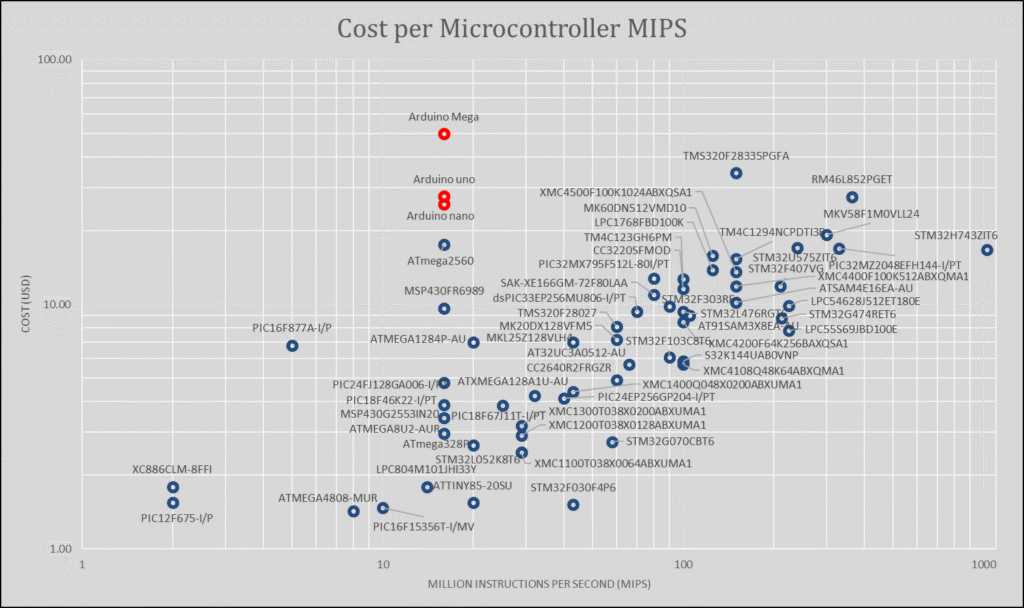
When your design demands faster sampling, tighter control loops, or deterministic timing, the Arduino platform quickly becomes the bottleneck. Its limited clock rates and modest memory can’t compete with purpose-built MCUs from Microchip, ST, or NXP — devices that deliver ten to fifty times more compute for the same cost.
Hardware constraints deepen the problem. Arduino’s pinouts and I/O configurations weren’t designed for industrial peripherals like CAN, HSPWM, or QSPI. The moment you step beyond simple sensor polling, you’re forced to pile on shields and breakout boards — each one adding noise, latency, and cost.
And then there’s scalability. Shield stacking might pass in a makerspace, but it doesn’t survive a product enclosure or an EMI test. What began as a neat proof of concept turns into a tower of compromises.
The Cost and Time Penalty of Staying on Arduino
Scaling an Arduino prototype into a production product is rarely a linear process; it’s usually a complete re-engineering effort. You have to redraw the schematics for a custom PCB, swap out consumer-grade components for parts with stable lifecycles, and rewrite the firmware for professional IDEs like MPLAB X or STM32Cube.
For a startup, this rework phase is a silent killer. It burns through development capital and pushes back launch dates as you spend months solving problems you thought were already handled. Arduino is great for starting a project, but it’s rarely equipped to help you finish one.
The Gap Between Arduino Prototypes and Production-Ready Designs
The “it works on my breadboard” moment is often a false summit. The real work begins in the “gap”—the space between a functional lab prototype and a rugged, manufacturable board that can survive in the field and scale to thousands of units.
Bridging this gap usually means starting from zero. You have to tighten layout rules, optimize signal integrity, and ensure your BOM is actually sourceable. What felt like 90% completion on the bench often turns out to be only 10% of the way to a shippable product.
From Breadboard to PCB: Why Re-Engineering Happens
Breadboards are incredibly forgiving, but professional PCBs are not. The loose headers and jumper wires used in the Arduino ecosystem don’t translate to a professional CAD environment like Altium or KiCad.
To make the jump, you’re forced to rebuild your schematics from scratch. Pin assignments change, footprints must be verified, and routing must be carefully managed to meet clearance and impedance standards. This translation phase is where most engineering hours are wasted—redrawing circuits that were already “proven” in the lab.
Firmware Porting Challenges
Arduino’s “wrappers” (like analogRead() or digitalWrite()) are great for beginners, but they hide the register-level control that professional firmware requires. When you move to a bare-metal environment in a professional IDE, that portability vanishes.
Code that worked in the Arduino IDE often has to be rewritten line-by-line. Timers, interrupt vectors, and peripheral initializations differ wildly between chips. What was intended to be a quick port becomes a massive software overhaul, adding weeks of debugging before the hardware is even ready.
BOM and Component Lifecycle Issues
A major hidden risk in hobbyist boards is the Bill of Materials. Many components are chosen for their ease of use or price on the consumer market, not their longevity. For a commercial product, a single “End of Life” (EOL) notification for a critical IC can freeze your entire production line.
Professional engineering requires components with 10-to-15-year production commitments. The hobbyist ecosystem simply cannot guarantee the supply chain stability needed for products that are expected to live in the field for years.
Develop hardware at the speed of software.
Download this Altium Schematic and hundreds of other subcircuits from the Quickboards library. Design your next board through modular circuit blocks. Each block contains Schematic + PCB Layout + Firmware, built to IPC standards for zero re-spins.
What Professionals Look for in an Arduino Alternative
A professional alternative isn’t just a board with a faster clock. It’s a platform built for the entire lifecycle of a product—prioritizing cost efficiency, scalability, and design maturity.
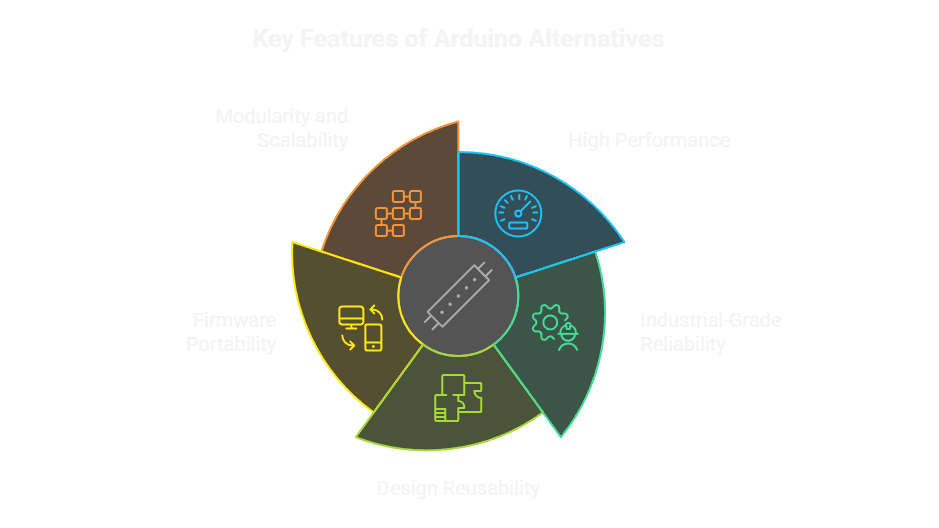
High Performance
Engineers need high throughput and lean firmware loops. Modern MCUs offer far more compute power (MIPS) per dollar than legacy Arduino chips, often including built-in DSP or DMA capabilities. A professional alternative must provide the headroom to handle communication stacks and complex signal processing without hitting a performance ceiling.
Industrial-Grade Reliability
Professionals design for 24/7 operation and harsh environments. This means using components with proven track records and stable electrical characteristics—parts that are rated for industrial or automotive temperatures, not just climate-controlled labs.
Design Reusability
Real efficiency comes from not starting over. A professional ecosystem should allow you to drag and drop verified circuit blocks—including footprints and layout guidelines—directly into your CAD tool. Every reused schematic block is one less chance for a “failed first spin” of your PCB.
Firmware Portability
Hardware is only useful if the software can move with it. You need drivers and libraries that integrate with industry-standard IDEs like STM32Cube or MPLAB. This ensures you aren’t fighting register definitions every time you update your hardware.
Modularity and Scalability
Modular design is a business strategy. It allows you to mix and match MCU, power, and sensor blocks across different projects without redesigning the entire system from the ground up.
Exploring Common Arduino Alternatives (and Their Trade-Offs)
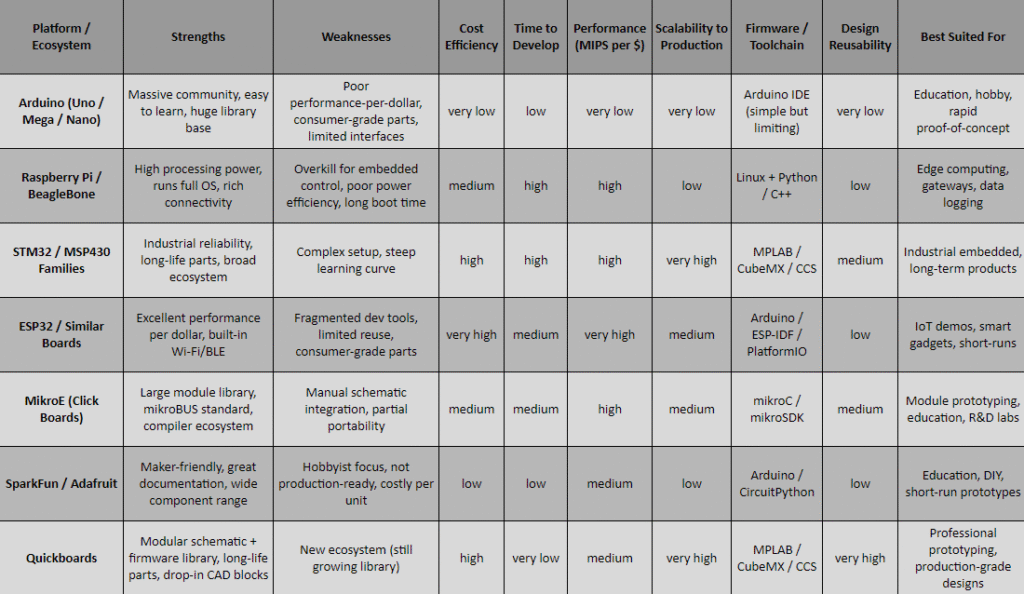
Before we get to the better solution, it’s worth surveying the landscape. The market is flooded with boards that promise to go “beyond Arduino,” and many do — in performance, connectivity, or toolchain sophistication. But few translate easily into production-ready hardware.
Raspberry Pi and BeagleBone
For Linux-based control, data logging, or IoT gateways, Raspberry Pi and BeagleBone are heavy hitters. They deliver raw power, community support, and full operating systems.
But that strength is also their weakness. Boot times, kernel dependencies, and OS instability make them poor fits for deterministic or low-latency control. Power efficiency? Forget it. These boards are phenomenal for edge computing, not for real-time embedded design.
PIC24, STM32 and MSP430 Platforms
At the professional end of the spectrum sit families like PIC24, STM32 and MSP430 — the industry’s workhorses. They’re backed by mature toolchains, broad peripheral sets, and long production lifespans.
The catch? Complexity. Configuring clock trees, timers, and peripherals is non-trivial. Getting a UART or PWM working the first time often means a weekend of datasheets and debugging. For teams on tight timelines, the learning curve is steep and the bring-up time can dwarf early-stage momentum.
ESP32 and Similar Boards
If you’re chasing value per dollar, the ESP32 and its cousins look unbeatable. Dual-core performance, Wi-Fi and Bluetooth built in, a thriving open-source community — all for the cost of a takeaway lunch.
But development fragmentation is a constant headache. Toolchains vary, libraries conflict, and hardware documentation is inconsistent. Worse, the ecosystem leans toward disposable consumer gadgets rather than long-term production. Reuse and standardization are afterthoughts.
MikroE Ecosystem
MikroElektronika (MikroE) offers an impressive library of “Click Boards” covering sensors, converters, and interfaces — a modular approach that feels close to professional. Their mikroBUS standard is elegant and their compiler ecosystem is extensive.
Yet despite the breadth, integration is still manual. Engineers must adapt schematics from pdfs, build their own footprints, and modify firmware from the Click compiler due to compatibility issues. It’s modular, yes — but not seamless. The concept stops short of bridging the prototype and product.
SparkFun and Adafruit
Then the maker world’s backbone: SparkFun and Adafruit. Their circuits, kits, and breakout boards make experimentation delightful and education accessible. They’ve done more than anyone to nurture the modern hardware community.
But these ecosystems are inherently project-oriented, not production-oriented. Their parts favor convenience over cost. They’re ideal for learning, proof-of-concept demos, or short-run builds — not for repeatable, certifiable, scalable hardware development.
Why None Fully Solve the Transition Problem
Each of these options solves a piece of the puzzle, but none address the workflow. You’re still stuck redrawing schematics and rewriting firmware when it’s time to move from a “dev kit” to a real product.
Introducing Quickboards: The Bridge Between Prototype and Production
What Are Quickboards?
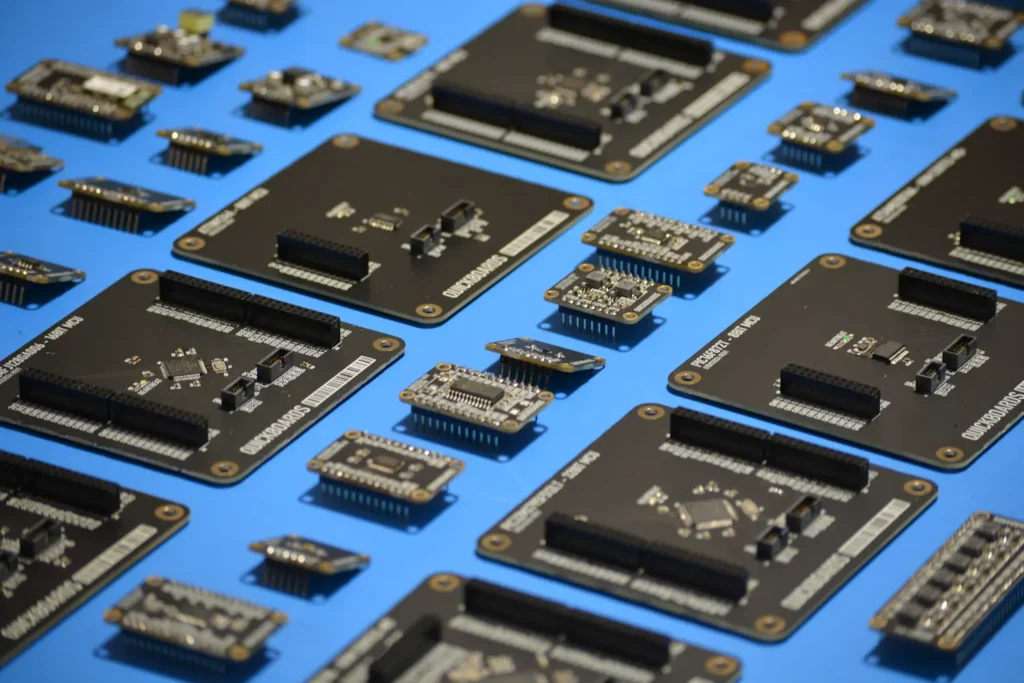
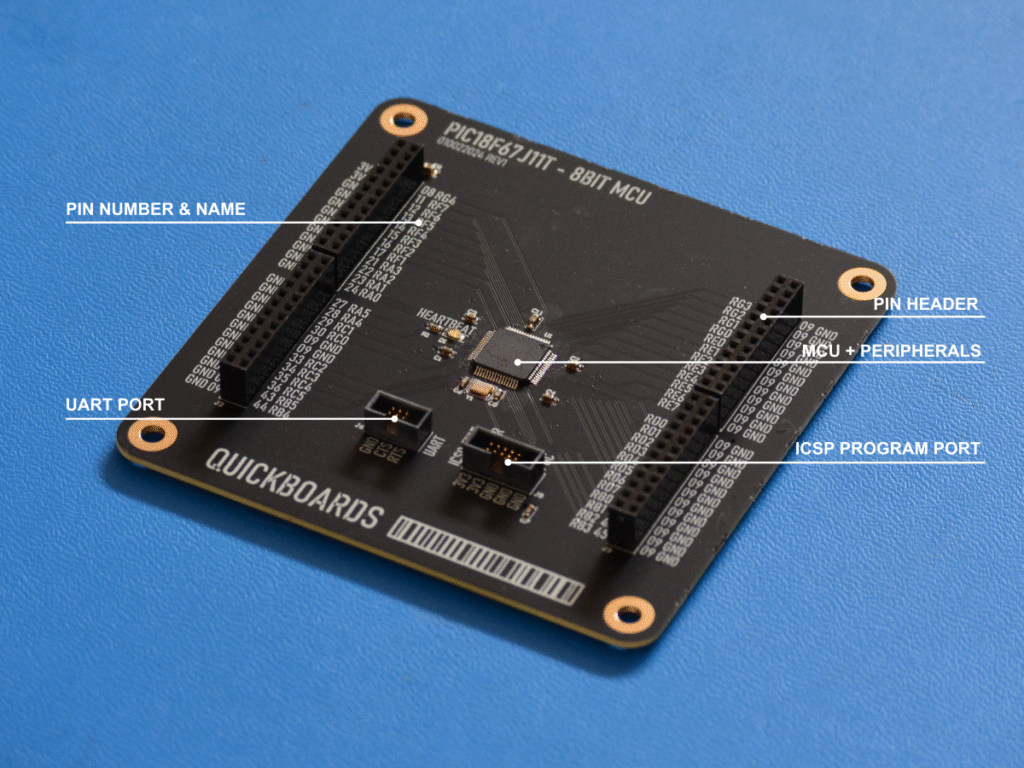
Quickboards is where modular thinking meets professional engineering. It’s a library of hardware, schematic and firmware blocks—each one a complete, verified circuit built to drop directly into your workflow. From microcontrollers and power converters to amplifiers and sensors, every block comes with its own downloadable schematic and matching firmware driver.
Each schematic also exists as a physical development board, letting engineers prototype and validate in hardware before committing to layout. Just build, test, and scale—seamlessly.
Develop hardware at the speed of software.
Download this Altium Schematic and hundreds of other subcircuits from the Quickboards library. Design your next board through modular circuit blocks. Each block contains Schematic + PCB Layout + Firmware, built to IPC standards for zero re-spins.
Build Faster with Verified Reference Designs
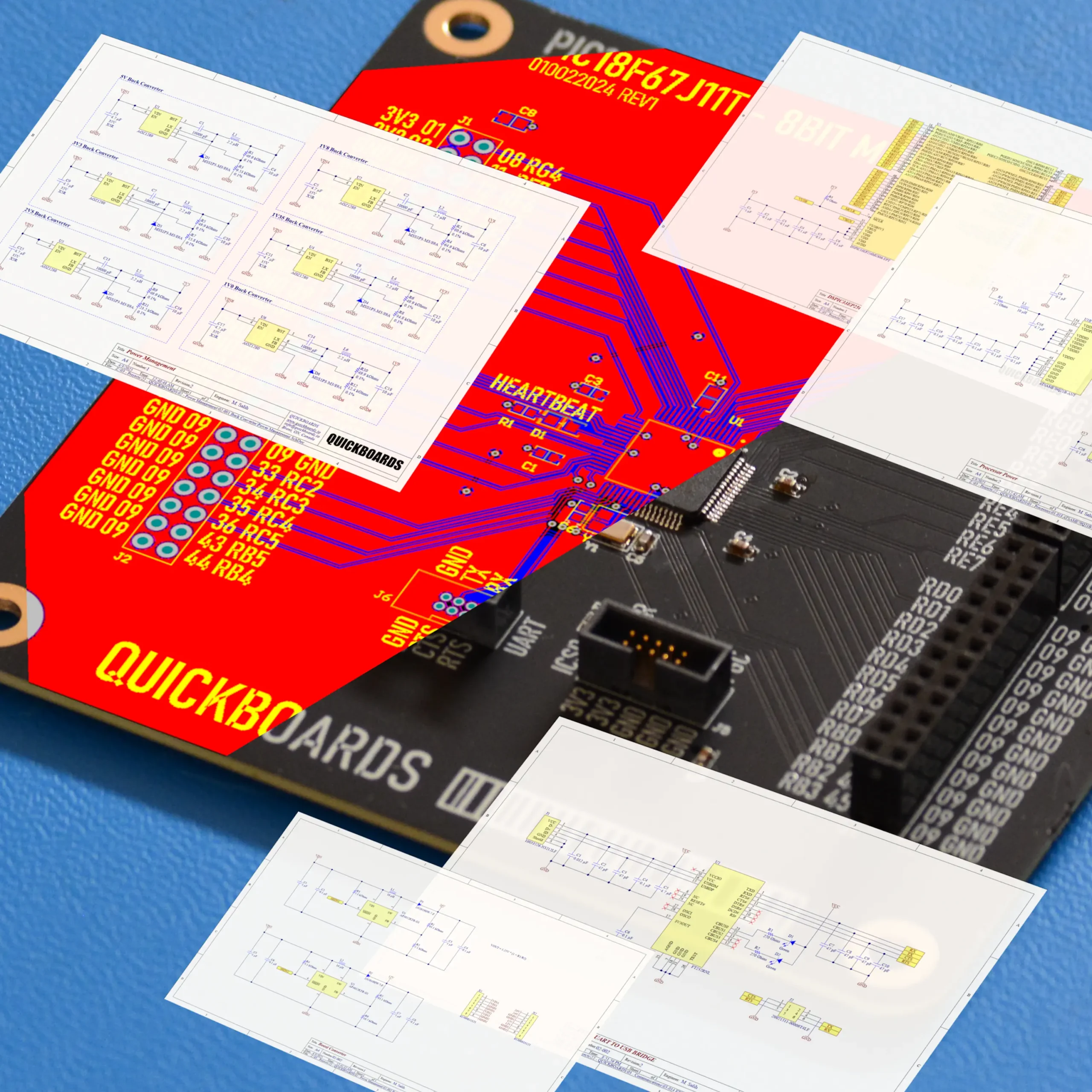
Why start from a blank schematic when proven circuits already exist? Quickboards lets you copy-paste verified reference designs straight into Altium, KiCad, or Eagle. Each block is tested for signal integrity, power stability, and noise performance—real engineering metrics that matter when your goal is a first-spin success, not a re-spin apology.
Every module you import eliminates hours of symbol creation, footprint checks, and datasheet cross-referencing. It’s speed with confidence built in.
Modular Firmware Integration
Hardware is only half the equation. Each Quickboard block includes a firmware driver—pre-configured for professional environments such as MPLAB X, STM32Cube, or Code Composer Studio.
Whether you’re spinning up a PIC, dsPIC, SAMD, or STM32, the firmware drops in cleanly. Initialization, communication, and peripheral control are already handled. No more wrestling with configuration bits or debugging register mismatches—just compile, connect, and go.
Open, Reusable, and Production-Ready
Quickboards are built for the long game. Every design uses industrial and automotive-grade components with multi-year availability guarantees. BOMs are optimized for supply stability, not convenience.
Each block is open, editable, and interoperable across major ECAD platforms, so you can adapt it to your exact design language. Once integrated, it becomes part of your reusable design library—ready for the next project, not forgotten in a folder.
Unlike other Arduino alternatives for professional prototypes, Quickboards isn’t just a faster board—it’s a complete modular design ecosystem that connects the simplicity of prototyping with the structure and reliability of production.
How Quickboards Accelerates Professional Prototyping
Cut Design Time by 60%
In traditional development, the clock starts long before the code does. Symbol creation, pin mapping, decoupling choices, and firmware initialization quietly eat up days—or weeks.
Quickboards wipes that slate clean. Every block arrives ready to drop into your design, with schematic symbols, footprints, and firmware pre-verified. Engineers skip the setup grind and jump straight into building real functionality.
Reduce Project Risk
Every Quickboard is validated in both hardware and firmware. Power rails are stable. I/O configurations are tested. Peripheral drivers are known to compile and run. That means no surprises at bring-up—and far fewer first-spin failures, the silent killers of project timelines.
For design firms and startups, this validation isn’t just convenience—it’s risk management. Each reused block is a block of confidence.
From Concept to PCB in Days, Not Months
Quickboards are built for plug-and-play integration. Entire subcircuits—MCUs, sensors, power stages—can be imported directly into Altium, KiCad, or Eagle, producing a functional schematic in hours.
Instead of waiting months to validate a new board, engineers can move from idea to assembled prototype in a single development sprint. It’s not rapid prototyping anymore—it’s professional prototyping, accelerated.
Works Across Multiple MCU Families
No lock-in, no silos. Quickboards supports PIC, dsPIC, SAMD, STM32, and more. You can choose the MCU family that fits your project’s performance, cost, or power target without overhauling your design flow. The schematic blocks stay consistent; only the silicon changes.
Works Across Multiple ECAD Tools
Quickboards plays well with others. Whether your team runs Altium, KiCad, or Eagle, each block drops cleanly into your environment. There’s no proprietary formatting, no forced platform, no hidden ecosystem traps.
It’s engineering freedom by design—a library that moves with you, not one that fences you in.
Get Started with Quickboards
Browse the Library
Explore hundreds of modular blocks across key categories — microcontrollers, power management, sensors, signal conditioning, and more — each ready for download.
Download and Integrate
Simply download the schematic files and drop them into your preferred CAD tool. All footprints, net names, and ports make integration seamless.
Build and Customize
Modify only what you need. Add your company-specific components or tweak parameters while keeping the proven Quickboards backbone intact.
Join the Community
Access tutorials, updates, and an affiliate rewards program that lets engineers share Quickboards and earn from referrals. The Quickboards ecosystem is for collaboration and continuous growth.
Final Thoughts: Bridging the Prototype-to-Product Divide
Arduino helped millions start their journey into embedded design. But when it’s time to build something professional, engineers need more control, reliability, and scalability.
Quickboards bridges that gap.
It takes the modular simplicity that made Arduino successful and upgrades it for professional use — with verified schematics, firmware drivers, and production-grade components.
Engineers shouldn’t have to restart designs from scratch.
With Quickboards, your next prototype can be your first production-ready design.
If you’re ready to move beyond Arduino and explore Arduino alternatives for professional prototypes, Quickboards gives you the fastest path from concept to production.
Frequently Asked Questions
Arduino boards are great for learning and quick proof-of-concepts, but they fall short in performance, reliability, and scalability. Their consumer-grade parts and limited interfaces make them hard to transition into commercial hardware. Professional engineers need alternatives that offer higher processing power, long-term component availability, and design reusability — exactly what Quickboards provides.
Platforms like STM32 and ESP32 deliver better performance, but they still require engineers to start from scratch when designing schematics and firmware. Quickboards solves this by providing pre-verified schematic blocks and modular firmware drivers, so you can drop entire circuits directly into your CAD tool. It bridges the gap between experimentation and production instead of just replacing the board.
Yes. Quickboards supports Altium, KiCad, and Eagle, with each block formatted for seamless import. You don’t need to change your toolchain or workflow — you simply download, integrate, and build.
Quickboards includes schematic and firmware support for popular MCU families such as Microchip PIC and dsPIC, Microchip SAMD, and STMicroelectronics STM32. The goal is flexibility: you can choose the MCU that best fits your cost, power, or performance needs without redesigning your entire circuit.
Absolutely. Quickboards was designed for that exact scenario. Engineers can replicate their Arduino-level functionality using modular schematic blocks — like MCU, sensor, or power modules — that are production-ready. You get the same simplicity of Arduino prototyping but with industrial-grade components, reusable design files, and firmware built for professional IDEs.

Cool chart about cost per MIPS, but some appear to calculate Fosc as mips which is not always the case.
Will Quickboards support STM32?